 白眉大叔
白眉大叔 https://gitee.com/wang-huamao/dockerfile.git
ngx_http_reqstat_module 模块 这个模块计算定义的变量,根据变量值分别统计 nginx 的运行状况。
可以监视的运行状况有:连接数、请求数、各种响应码范围的请求数、输入输出流量、rt、upstream访问等。
可以指定获取所有监控结果或者一部分监控结果。 利用变量添加自定义监控状态。总的监控状态最大个数为50个。 回收过期的监控数据。 设置输出格式
跟踪请求,不受内部跳转的影响 不要使用与响应相关的变量作为条件,比如"$status"
现在通过ngx_req_status_module能够统计Nginx中请求的状态信息。需要安装第三方模块
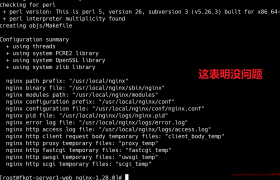
正常的安装编译安装 ngx_http_reqstat_module 模块
# install `ngx_http_reqstat_module`
wget https://github.com/zls0424/ngx_req_status/archive/master.zip -O ngx_req_status.zip

unzip ngx_req_status.zip

patch -p1 < ../ngx_req_status-master/write_filter.patch

./configure --prefix=/usr/local/nginx --add-module=/path/to/ngx_req_status-master

make -j2

make install
用 Dockerfile 制作镜像
第一部分:构建基础镜像:
Dockerfile
#FROM centos:centos7.9.2009

#编译nginx的基础镜像
FROM registry.cn-hangzhou.aliyuncs.com/baimeidashu/bmds:centos-centos7.9.2009
MAINTAINER zhaozhiyong  "715740383@qq.com"

# 配置国内软件源
RUN mv /etc/yum.repos.d/CentOS-Base.repo /etc/yum.repos.d/CentOS-Base.repo.backup \
   && curl -o /etc/yum.repos.d/CentOS-Base.repo http://mirrors.aliyun.com/repo/Centos-7.repo \
   && sed -i -e '/mirrors.cloud.aliyuncs.com/d' -e '/mirrors.aliyuncs.com/d' /etc/yum.repos.d/CentOS-Base.repo \
   &&   yum -y install git wget gcc make zlib-devel gcc-c++ libtool openssl openssl-devel patch pcre
build.sh
#!/bin/bash

# 设置变量
IMAGE_NAME="bmds"
IMAGE_TAG="centos7.9.2009-for-nginx-bianyi-v1.0"
DOCKERFILE_PATH="./Dockerfile"
BUILD_CONTEXT="./"

# 构建 Docker 镜像

docker build -t $IMAGE_NAME:$IMAGE_TAG -f $DOCKERFILE_PATH $BUILD_CONTEXT

# 推送镜像到镜像仓库(可选)
registry_url="registry.cn-hangzhou.aliyuncs.com"
username="chaoren3***"
password="baimei***"
docker login $registry_url -u $username -p $password


docker tag $IMAGE_NAME:$IMAGE_TAG registry.cn-hangzhou.aliyuncs.com/baimeidashu/$IMAGE_NAME:$IMAGE_TAG
docker push registry.cn-hangzhou.aliyuncs.com/baimeidashu/$IMAGE_NAME:$IMAGE_TAG


# 输出构建完成信息
echo "registry.cn-hangzhou.aliyuncs.com/baimeidashu/$IMAGE_NAME:$IMAGE_TAG   built successfully."
2: 编译nginx 1.28.0
Dockerfile
#FROM centos:centos7.9.2009
#FROM registry.cn-hangzhou.aliyuncs.com/baimeidashu/bmds:centos-centos7.9.2009
FROM registry.cn-hangzhou.aliyuncs.com/baimeidashu/bmds:centos7.9.2009-for-nginx-bianyi-v1.0
MAINTAINER zhaozhiyong  "715740383@qq.com"


# 获取 reqstat 模块源码

COPY ./ngx_req_status-master /tmp/ngx_req_status-master
COPY ./nginx-1.28.0 /tmp/nginx-1.28.0

RUN cd /tmp && \
    cd nginx-1.28.0 && \
	patch -p1 < /tmp/ngx_req_status-master/write_filter-1.7.11.patch

# 下载并编译 Nginx 1.26.0 源码(带 reqstat 模块)
RUN cd /tmp && \
    cd nginx-1.28.0 && \
    ./configure \
        --prefix=/etc/nginx \
        --sbin-path=/usr/sbin/nginx \
        --modules-path=/usr/lib/nginx/modules \
        --conf-path=/etc/nginx/nginx.conf \
        --error-log-path=/var/log/nginx/error.log \
        --http-log-path=/var/log/nginx/access.log \
        --pid-path=/var/run/nginx.pid \
        --lock-path=/var/run/nginx.lock \
        --with-http_ssl_module \
        --with-http_v2_module \
        --with-http_realip_module \
        --with-http_stub_status_module \
        --without-http_gzip_module \
        --with-pcre \
        --with-file-aio \
        --with-stream \
        --with-stream_ssl_module \
        --with-stream_realip_module \
        --add-module=/tmp/ngx_req_status-master && \
    make && \
    make install

# 创建 conf.d 目录
RUN mkdir -p /etc/nginx/conf.d

# 在 http 块内添加 include 语句
RUN awk '/http\s*{/ { print; print "    include /etc/nginx/conf.d/*.conf;"; next } { print }' /etc/nginx/nginx.conf > /tmp/nginx.conf && \
    mv /tmp/nginx.conf /etc/nginx/nginx.conf


# 清理编译文件
RUN rm -rf /tmp/nginx-* /tmp/ngx_req_status-master

# 设置工作目录
WORKDIR /etc/nginx
#当前使用 CMD ["tail","-f","/etc/hosts"] 仅用于调试
#CMD ["tail","-f","/etc/hosts"]


#实际部署时应改为 CMD ["nginx", "-g", "daemon off;"]

CMD ["nginx", "-g", "daemon off;"]
然后:
bulide.sh
测试: docker-compose.yaml
version: "3"
services:
  nginx:
    image: registry.cn-hangzhou.aliyuncs.com/baimeidashu/bmds:nginx-1.28.0-ngx-req-status-v1.1
    restart: always
    container_name: nginx
    environment:
      - TZ=Asia/Shanghai
    ports:
      - "80:80"
    volumes:
      - ./nginx.conf:/etc/nginx/conf/nginx.conf
      - ./logs:/var/log/nginx
测试:

欢迎来撩 : 汇总all