 白眉大叔
白眉大叔 Ingress-Nginx使用指南上篇 - 尹正杰 - 博客园
版本对应:
根据配套关系,我这里的k8s 1.28.2安装Ingress-nginx 1.10.1版本。
| Ingress-NGINX version | k8s supported version | Alpine Version | Nginx Version | Helm Chart Version |
|---|---|---|---|---|
| v1.10.1 | 1.29, 1.28, 1.27, 1.26 | 3.19.1 | 1.25.3 | 4.10.1* |
| v1.10.0 | 1.29, 1.28, 1.27, 1.26 | 3.19.1 | 1.25.3 | 4.10.0* |
| v1.9.6 | 1.29, 1.28, 1.27, 1.26, 1.25 | 3.19.0 | 1.21.6 | 4.9.1* |
| v1.9.5 | 1.28, 1.27, 1.26, 1.25 | 3.18.4 | 1.21.6 | 4.9.0* |
| v1.9.4 | 1.28, 1.27, 1.26, 1.25 | 3.18.4 | 1.21.6 | 4.8.3 |
| v1.9.3 | 1.28, 1.27, 1.26, 1.25 | 3.18.4 | 1.21.6 | 4.8.* |
| v1.9.1 | 1.28, 1.27, 1.26, 1.25 | 3.18.4 | 1.21.6 | 4.8.* |
| v1.9.0 | 1.28, 1.27, 1.26, 1.25 | 3.18.2 | 1.21.6 | 4.8.* |
| v1.8.4 | 1.27, 1.26, 1.25, 1.24 | 3.18.2 | 1.21.6 | 4.7.* |
| v1.7.1 | 1.27, 1.26, 1.25, 1.24 | 3.17.2 | 1.21.6 | 4.6.* |
| v1.6.4 | 1.26, 1.25, 1.24, 1.23 | 3.17.0 | 1.21.6 | 4.5.* |
| v1.5.1 | 1.25, 1.24, 1.23 | 3.16.2 | 1.21.6 | 4.4.* |
| v1.4.0 | 1.25, 1.24, 1.23, 1.22 | 3.16.2 | 1.19.10† | 4.3.0 |
| v1.3.1 | 1.24, 1.23, 1.22, 1.21, 1.20 | 3.16.2 | 1.19.10† | 4.2.5 |
- 使用kubectl apply,使用YAML文件;
部署ingress-nginx(国内安装)_ingress-nginx 镜像-CSDN博客
阿里镜像直接运行
复制文件:
Ingress-ngnix1.yaml
nginx-ingress/ Ingress-ngnix1.yaml at main · chaoren399/nginx-ingress
kubectl apply -f Ingress-ngnix1.yaml2 查看pod状态
查看pod状态。可以看到ingress-nginx-controller的pod在正常运行
kubectl get pods -o wide -n ingress-nginx
3 查看ingress-nginxservice状态。
kubectl get service -n ingress-nginx

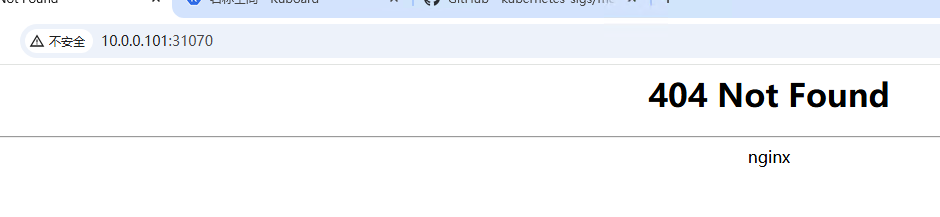
4 访问:
http://10.0.0.101:31070/
5创建Ingress资源
ingress.yaml文件的内容如下:
apiVersion: networking.k8s.io/v1
kind: Ingress
metadata:
  name: foo
  namespace: hello-world

spec:
  rules:
    - host: example.net
      http:
        paths:
          - path: /hello
            pathType: Exact
            backend:
              service:
                name:  hello-world
                port:
                  number: 8080
          - path: /foo
            pathType: Exact
            backend:
              service:
                name:  service1
                port:
                  number: 80
创建Ingress资源:
kubectl create namespace hello-world
kubectl apply -f ingress.yaml
这条命令会创建一个名为“hello-world”的Ingress资源,将所有以“/hello”开头的请求转发到“hello-world”服务的8080端口。创建完成后,可以使用下面的命令来检查Ingress资源是否创建成功:
kubectl describe ingress -n hello-world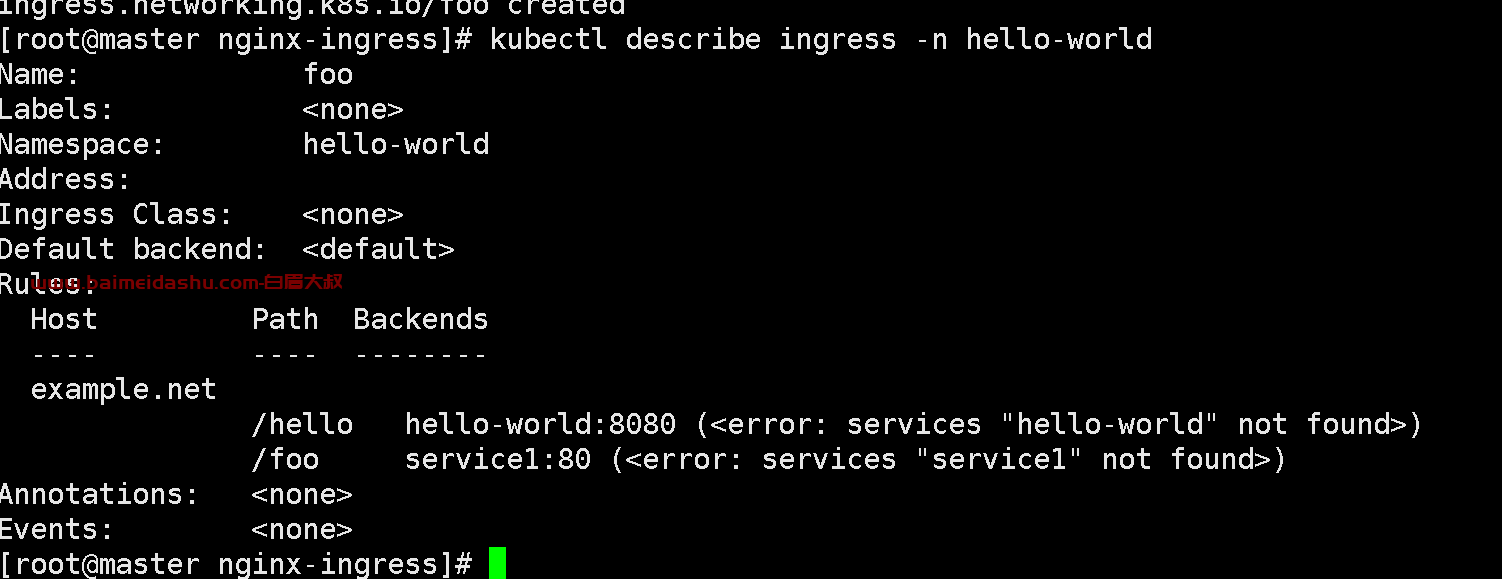
6 部署应用
接下来,需要部署应用,使用下面的命令来部署一个简单的应用:
kubectl run hello-world \
--image=registry.cn-hangzhou.aliyuncs.com/baimeidashu/myspring:v1.0 \
--port=8080
欢迎来撩 : 汇总all